
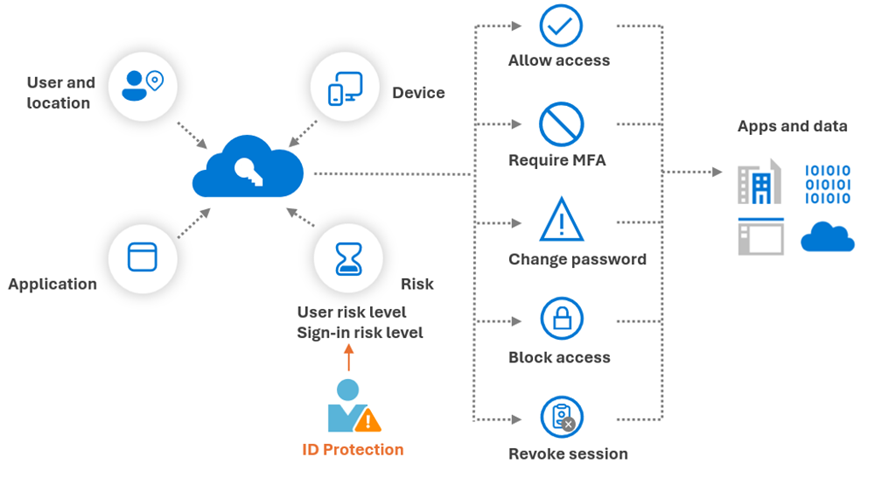
Azure AD Conditional Access is the policy engine in Microsoft Entra ID (Azure AD) that allows organizations to enforce access controls based on conditions such as user, device, location, application, and importantly, sign-in risk. A risk-based identity model refers to using signals from Azure AD Identity Protection (which assesses user and sign-in risks) as input to Conditional Access policies. This combination enables adaptive authentication: users are prompted for additional verification or even blocked only when sign-in behavior is deemed risky, rather than uniformly applying strict measures to all sessions.
Azure AD Identity Protection calculates two primary risk levels: – User Risk – the likelihood that a user’s account is compromised. For example, if a user’s credentials are found in a leaked credentials database or there are signs their account was breached, their user risk is elevated (medium or high). – Sign-in Risk – the likelihood that a specific authentication attempt is malicious. This is evaluated in real-time for each login using factors like “impossible travel” (logging in from two far-apart locations in a short time), unfamiliar IP addresses, infected devices, atypical access patterns, anonymous IP (TOR), etc.. Each sign-in gets a risk tag: e.g., sign-in from a TOR exit node might be tagged medium risk; sign-in from a known botnet IP might be high risk.
Now, Conditional Access policies can take these risk levels as conditions. For instance, a typical policy might be: – If sign-in risk is medium or above, then require MFA; if it’s high, block access altogether. – If user risk is high (meaning we think the account is likely compromised), then require the user to perform a secure password change before allowing access. Alternatively, you might block all access for high user-risk accounts until an administrator can verify the user’s identity and reset their credentials.
This approach is dynamic and just-in-time. For a concrete example: suppose Alice normally logs in from New York on her work laptop. Suddenly there’s a successful login for Alice from Russia on an unknown device – Identity Protection flags this sign-in as “High risk” (maybe impossible travel or unfamiliar location/device). Conditional Access sees Sign-in risk = High and might have a policy: “High sign-in risk -> Block access”. So that login is immediately blocked, preventing a potential breach. Or perhaps the policy is slightly softer: “High sign-in risk -> Require MFA.” In that case, the unexpected login from Russia would trigger an MFA challenge (which the attacker likely cannot satisfy if they only have password). Conversely, if Alice logs in under usual conditions (low risk), she might not be prompted for MFA every time, which improves her user experience while still maintaining security – this is the benefit of risk-based models: more friction only when needed.
Another scenario: Bob’s credentials were leaked (user risk high). A Conditional Access policy for user risk might say: “If user risk = High, force password reset upon next login”. So Bob tries to log in; Azure AD knows his account is marked high risk, so Bob is required to go through a password change flow right then, effectively “remediating” the risk by invalidating the leaked password. Azure calls this self-remediation, since the user themselves, guided by policy, mitigates the risk (without needing IT support to intervene in many cases). Once Bob changes his password and maybe passes an MFA challenge, his account risk can drop back to normal (because the compromised credential is no longer usable).
These risk-based policies are powered by machine learning and Microsoft’s vast telemetry. Identity Protection analyzes “hundreds of signals in real-time” for each authentication. For instance, they maintain a list of anonymous proxy IPs, typical user geolocation patterns, device health, etc. If something deviates from the norm or matches known attack patterns, risk is raised automatically.
Implementing risk-based Conditional Access significantly enhances security posture. It helps organizations move towards a Zero Trust approach (“never trust, always verify”). Instead of outright trusting a login with correct password, Azure AD asks additional questions based on context: Is this really the user? Could this login be a token replay or a stolen password? If risk is low, access proceeds normally (no extra prompts). If risk is medium or high, Azure AD intervenes (by MFA, or by denying).
Microsoft recommends common patterns such as: – Always require MFA for high-risk sign-ins (so that, for example, if someone’s password was guessed, the attacker still can’t get in without the second factor). – Block extremely risky sign-ins or risky users until an admin can investigate. For example, if Identity Protection flags that a user’s account is definitely compromised (maybe multiple signs of breach), you might auto-block until the security team clears it. – Require password change for high user risk as mentioned, which automatically reduces risk after completion. – Use “report-only” mode first for new policies – an admin can simulate these policies (Azure AD CA has report-only mode) to see what would have happened, fine-tune conditions, then enforce them fully.
One of the powerful outcomes of risk-based CA is that it not only reacts to known compromised situations but also learns normal user behavior and catches anomalies. An example: a “sign-in frequency” control can force reauthentication each time risk is detected or at set intervals. Many organizations set a conditional access that basically says: if the sign-in risk is high, require reauthentication even if a session token is still valid. This mitigates persistent attacks.
From a user perspective, this model balances security and usability. Users won’t be unduly challenged when there’s no sign of risk (e.g., usual logins during normal hours on their work device will sail through if all checks are good). But behind the scenes, Azure is continuously evaluating risk. If something is off – maybe an impossible travel or a login from a TOR network – that user will face additional verification or be blocked. This prioritizes resources: helpdesk isn’t flooded with everyone doing MFA daily, only those who hit risk triggers; security team can focus on the alerts for actually risky logins rather than parsing through thousands of events.
In real life, consider a company where phishing attacks are common. With risk-based CA, if a user inadvertently enters credentials on a phish (the attacker now has the password), the next time the attacker tries to use that password from their infrastructure, Azure AD might flag it (unfamiliar location, maybe known bad IP range). The attacker’s login gets an MFA challenge they cannot fulfill, or even a block. Meanwhile, Identity Protection increases that user’s risk, which can trigger a password reset requirement. All this might happen automatically, thwarting the attack without the security team having to intervene in the moment.
In summary, Azure AD Conditional Access with risk-based policies adds an intelligent adaptive layer to identity security. It uses continuous risk assessment to make access decisions, which significantly reduces the chance of account compromise leading to breach, because even stolen credentials often won’t be enough to pass a high-risk challenge. This model is a key component of Azure AD’s security stack, helping organizations achieve fine-grained control and align with both Zero Trust and user-friendly design by only inconveniencing users when there’s a security justification.