Azure Key Vault is Microsoft’s cloud service for secure key management, secret storage, and certificate management. It provides a centralized, secure vault for encryption keys (like RSA, elliptic curve keys), application secrets (API keys, passwords), and TLS/SSL certificates. There are two primary “architectures” or modes to consider: the multi-tenant Key Vault service and the dedicated, single-tenant HSM service (called Azure Key Vault Managed HSM). Additionally, there’s Azure Dedicated HSM (physical hardware dedicated to one customer) and Azure Payment HSM for specific financial use cases, but these are more specialized. Let’s focus on the mainstream ones and how their architectures differ.
Multi-tenant Azure Key Vault: In this standard offering (Key Vault Standard or Premium tier), Microsoft operates the underlying hardware security modules (HSMs) and logically isolates tenants on them. When you create a Key Vault, you’re essentially getting a logical container for your keys/secrets on a cluster of HSMs that is shared among many Azure customers. Azure Key Vault in Premium tier uses hardware-protected keys (backed by FIPS 140-2 Level 2 validated HSMs) – meaning your keys are ultimately stored in HSMs for cryptographic operations. However, those HSMs are multi-tenant: your keys and other customers’ keys reside on the same physical devices, though strongly isolated by software and hardware partitions. This architecture is analogous to a secure apartment building: each tenant (customer) has their own unit (key vault) locked and separated, but the building (the HSM cluster) is shared, and the landlord (Microsoft) maintains the building. You rely on Microsoft to enforce that separation and to operate the HSM securely. Key Vault handles tasks like rolling keys, backing them up (in encrypted form), providing a high-availability front end, and integrating with Azure services (e.g., Azure Storage can use a Key Vault key for encryption).
Despite being multi-tenant, Azure Key Vault is highly secure – even Microsoft administrators do not see your plaintext keys; key operations happen within HSM boundaries. There is an important internal architecture detail: Key Vault uses a pool of Thales or Marvell LiquidSecurity HSMs under the hood, and your keys are stored encrypted with keys protected by those HSMs. Access control is done via Azure AD and Key Vault’s RBAC or access policy model – you grant applications or users permissions (like get secret, sign using a key, etc.), and the service enforces that. Microsoft cannot retrieve your keys in plaintext, because that would require breaking HSM security or the service’s code (which is strictly audited and designed to not output keys). However, it is still not entirely under your control because keys do reside on shared hardware that Microsoft manages and you must trust Azure’s security measures.
Managed HSM (single-tenant): Azure Key Vault Managed HSM is a different deployment architecture. When you provision a Managed HSM pool, Azure actually gives you a cluster of HSMs that are dedicated solely to you. It’s a single-tenant, fully isolated HSM as a service. Technically, it consists of 3 HSM partitions spread across multiple hardware modules (for resilience) within an Azure region. You (your tenant) are the only one using those HSMs, and they operate in a trust boundary where even Azure operators have no access to your keys. The architecture uses a concept of a security domain: when you initialize a Managed HSM, you set up a security domain with a key/password known only to you (often requiring multiple HSM Admins to contribute to it). This security domain is used to encrypt all keys in that HSM cluster. Even if Microsoft had physical access to the HSM, they can’t extract keys because they don’t have your security domain secret – it’s similar to how a hardware HSM in on-premises environment might require a quorum of smartcards to unlock; Azure never gets those secrets. Managed HSM is also FIPS 140-3 Level 3 validated, which meets very high compliance bars.
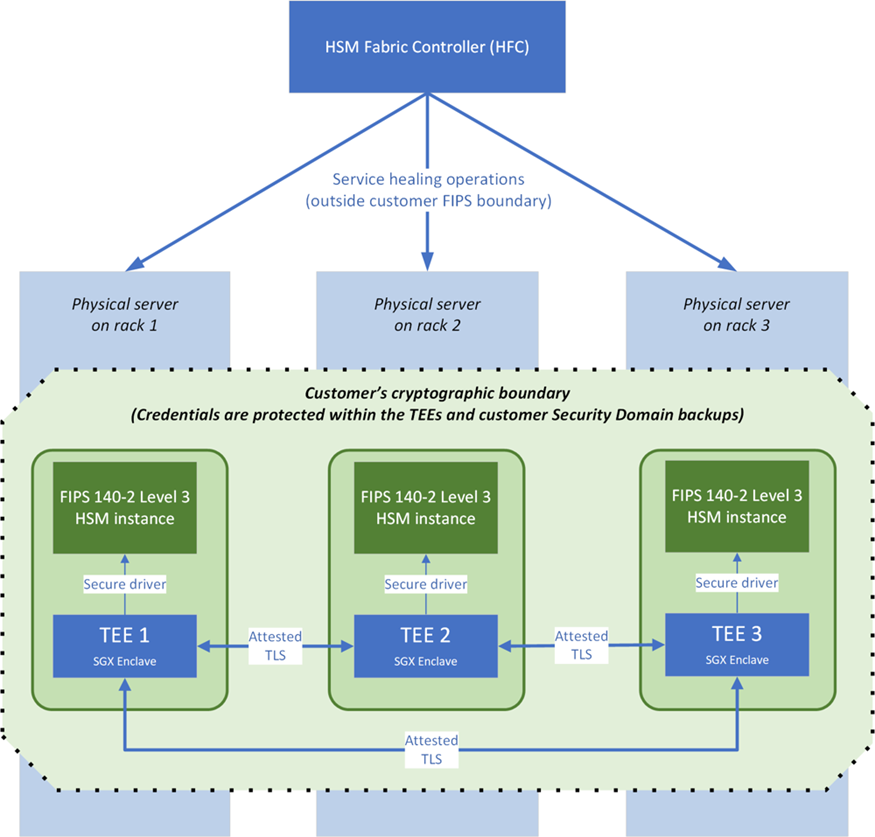
Internally, Managed HSM leverages both dedicated HSM hardware and Confidential Computing enclaves (SGX) for control plane operations. The control plane (HSM Fabric Controller) can manage the cluster (for things like patching firmware, handling failover), but it cannot see customer keys – admin commands affecting your HSMs run inside secure enclaves and strictly enforce that no key material leaves the HSM or enclave unencrypted. This architecture is illustrated in the provided figure: there is a cryptographic boundary that includes the HSM partitions and SGX enclaves, all dedicated to you, ensuring that even Microsoft’s highest privilege processes outside that boundary cannot read your keys.
Dedicated HSM: Azure also offers a service where you rent an entire HSM device (nCipher/Thales devices in Azure datacenters) – it’s essentially HSM in the cloud, but not integrated with Azure’s software layers. You get network access to a physical HSM module that you manage almost as if it were on-prem. You handle creating partitions, users, and so on. Microsoft’s involvement is just to host and power it, with minimal management. This provides ultimate control but lacks the ease of use and integration that Key Vault or Managed HSM have (for example, you cannot hook a Dedicated HSM directly to Azure SQL for TDE by configuration – you’d have to do it manually via code using that HSM’s SDK, etc.). The architecture here is literally a single-tenant hardware in a rack assigned to you.
Payment HSM is another specialized offering, giving you a PCI-compliant HSM (often required for payment processing like credit card PIN handling). It’s beyond typical scenarios unless you’re in finance needing that compliance.
Now, how do these architectures play out in practice? Many enterprises use a mix: – Regular secrets and application keys might go in multi-tenant Key Vaults (easier to use, cheaper). For instance, connection strings, TLS certificates, or less sensitive keys. – High-value keys – say the root keys of a company’s PKI, or customer-managed keys for very sensitive data encryption – might be put in a Managed HSM to satisfy compliance like “keys must be in a FIPS Level 3 device under sole control of data owner.” Managed HSM ensures these keys never leave hardware and that the customer has exclusive ownership of them. – If an organization already has on-prem HSMs and wants to lift-and-shift specific workloads without changing key processes, they might use Dedicated HSM. Or if they have a regulatory need for no logical sharing at all (e.g., some government or defense contexts might prefer physically isolated HSM). – Also, some might use Key Vault for secrets management and Managed HSM for encryption keys. The reason: Key Vault also stores things like passwords and small secrets which don’t necessarily need HSM backing (there’s a cost trade-off; HSM operations cost more), whereas encryption keys or signing keys might need HSM.
In terms of integration: Multi-tenant Key Vault is very well integrated: many Azure services support storing their secrets/keys in Key Vault (e.g., disk encryption keys, storage account encryption, SQL TDE, etc.). Managed HSM is newer but now also supports integration in many scenarios (e.g., you can use a Managed HSM key for Azure Information Protection, SQL TDE for Managed Instances, etc.). Managed HSM by design only supports keys (no secrets/certs, since it’s hardware keys only). The nice thing is both Key Vault and Managed HSM share a similar API surface, so adopting one or the other in code is similar.
From an architectural perspective: – Key Vault (multi-tenant) emphasizes ease of use and broad integration. Microsoft handles HSM clustering, redundancy, backup, all behind the scenes. You interact with a high-level service. – Managed HSM gives you a dedicated cluster (with automatic multi-node high availability). It also logs all operations for your review. But it still integrates with Azure AD for access control. A big difference is in governance: for example, Managed HSM has an isolated RBAC model where even a subscription owner cannot manage keys unless you explicitly give them HSM roles. This isolated model is intentionally so that even high-privileged Azure roles cannot tamper with HSM keys – only HSM-specific roles can (and you control those). – Dedicated HSM is isolated physically; you need your own client software to use it (often PKCS#11 or similar interfaces).
So, if we consider “architectures”: 1. Key Vault Standard/Premium architecture: customer -> Key Vault endpoint -> multi-tenant service -> HSM. Good for general purpose. 2. Managed HSM architecture: customer -> Managed HSM endpoint -> dedicated HSM cluster (with enclaves protecting control logic). Good for high-security, single-tenant requirement. 3. Dedicated HSM architecture: customer -> VPN or ExpressRoute -> physical HSM device on Azure rack. Good for niche scenarios requiring direct control.
In the provided figure (architecture of an HSM pool with enclaves), we see how the “customer’s cryptographic boundary” includes three FIPS Level 3 HSM instances and SGX TEEs. Azure’s management and fabric control exist outside that boundary, which is how Managed HSM ensures isolation. The HSM Fabric Controller (HFC) can orchestrate updates but cannot extract keys (it interacts only via allowed enclave code).
To summarize, Azure Key Vault and HSM architectures offer flexibility: – Use Key Vault (multi-tenant) when you need a managed service for secrets and keys that’s integrated and cost-effective, and where Microsoft-managed multi-tenancy is acceptable (which it is in most cases, as it’s still very secure). – Use Managed HSM when you have strict requirements for key isolation, FIPS 140-3 Level 3, or you want to hold your keys in a way that even Microsoft cannot logically access – for example, for master encryption keys of sensitive data, or to satisfy regulatory mandates about sole custody of keys. – Use Dedicated HSM if you have specialized hardware crypto needs (like HSM functions that Key Vault doesn’t provide, or you require a certified environment like PCI HSM for payment).
Each of these options is architected differently to balance security, compliance, and usability. Azure gives that continuum of control: from largely Microsoft-managed (Key Vault) to entirely customer-controlled (Dedicated HSM). The right architecture depends on the organization’s risk appetite and compliance obligations, but Azure’s approach ensures that even the multi-tenant architecture keeps keys secure in HSMs, and the more dedicated options simply add layers of isolation and control on top of that fundamental security.