
. Microsoft positions Durable Task Scheduler as the recommended backend for Durable Functions and Durable Task SDKs. In Consumption, the scheduler is billed per dispatched action, supports up to 500 actions per second, and retains orchestration data for up to 30 days, making it especially attractive for bursty agentic workloads, development, and variable serverless pipelines.
Architecture & Deep Dive.
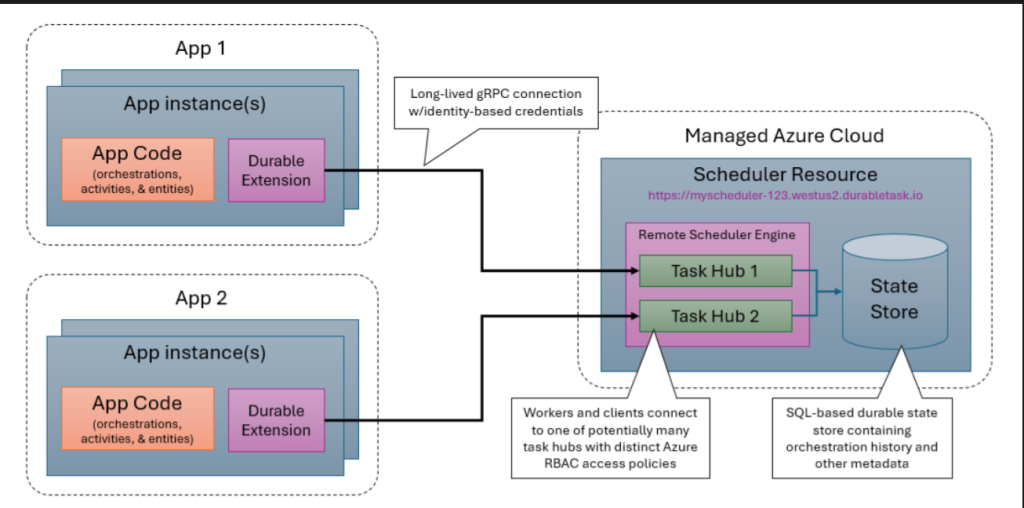
The scheduler is a separate Azure resource. Apps connect to it over gRPC secured with TLS and authenticated through managed identity, and work items are pushed rather than polled. That reduces storage-side overhead and often lowers orchestration latency relative to traditional polling-heavy storage backends. The Consumption footprint is still bounded by quotas and payload ceilings, so it is a strong fit for orchestration-heavy, payload-light AI coordination, not for blindly embedding large documents inside orchestration state.
Step-by-Step Implementation & Scripts.
Provision the scheduler and task hub first, then attach your Function App identity, then switch host.json to azureManaged. Microsoft’s guidance explicitly recommends unique task hubs per app and per slot to avoid conflicts.
az extension add –name durabletask
az group create –name rg-dts –location westeurope
az durabletask scheduler create \
–name dts-agent-orch \
–resource-group rg-dts \
–location westeurope \
–ip-allowlist “” \
–sku-name consumption
az durabletask taskhub create \
–resource-group rg-dts \
–scheduler-name dts-agent-orch \
–name agents-hub
az durabletask scheduler attach \
–resource-group rg-dts \
–name dts-agent-orch \
–task-hub-name agents-hub \
–role-type contributor \
–target /subscriptions/<subId>/resourceGroups/rg-fn/providers/Microsoft.Web/sites/fn-agents-prod \
–identity /subscriptions/<subId>/resourceGroups/rg-id/providers/Microsoft.ManagedIdentity/userAssignedIdentities/uami-dts
{
“extensions”: {
“durableTask”: {
“hubName”: “agents-hub”,
“storageProvider”: {
“type”: “azureManaged”,
“connectionStringName”: “DURABLE_TASK_SCHEDULER_CONNECTION_STRING”
}
}
}
}
Troubleshooting Guide & Common Edge Cases.
Typical failures cluster around RBAC, task-hub collisions, DNS/private-link misconfiguration, and misunderstanding of action-based charging. If orchestrations remain stuck or never leave pending, verify that the app identity has the correct Durable Task role at scheduler or task-hub scope, confirm the task hub is unique to that app, and validate private DNS resolution when public network access is disabled. For cost troubleshooting, profile orchestration action count rather than just orchestration count.
Best Practices.
Use user-assigned identities, unique task hubs, external storage for large payloads, and private endpoints for production. Treat the scheduler as an independently governed platform component, and budget costs in terms of action fan-out, timers, retries, and result processing, not only function executions.