
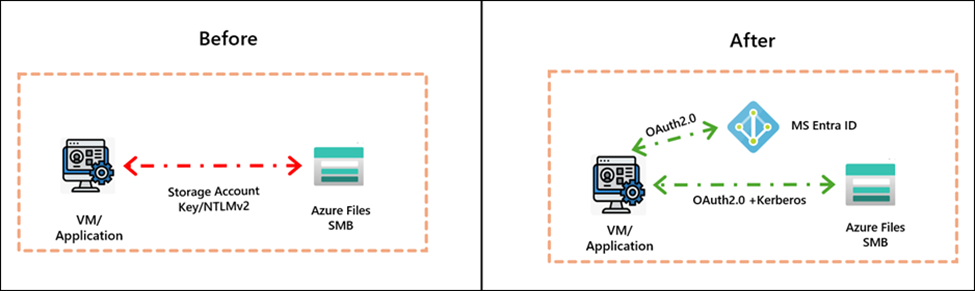
Azure Files now generally supports managed identities for SMB access, so Windows and Linux clients can mount SMB shares without storage account keys, passwords, or secret distribution. The hard requirements are to enable the storage account’s SMBOAuth property, assign the right Azure RBAC role such as Storage File Data SMB MI Admin, and refresh Kerberos credentials correctly on the client. For AKS, the underlying Azure Files capability is now GA, but the CSI integration paths for managed identity and workload identity are still documented as preview in AKS, with managed identity starting at AKS 1.34 and workload identity starting at AKS 1.35.0 on Linux nodes. Managed identity over SMB for Azure Files
Executive summary
The April 20, 2026 release is meaningful because it shifts SMB access to Azure Files away from shared-key operational patterns and toward identity-first access. Microsoft’s announcement highlights three practical changes: GA availability for managed identity authentication over SMB, coexistence of application identities and end-user access on the same storage account, and a simpler portal experience for enabling the feature. The corresponding Learn articles document the control point as the SMBOAuth property on the storage account and show concrete Windows, Linux, and AKS integration paths.
One nuance matters for architecture decisions: the storage-side feature is GA, but AKS-specific CSI-driven managed identity and workload identity mounts are still marked preview in the AKS documentation. That means the core capability is production-ready for Azure Files, while some Kubernetes consumption patterns still need preview risk handling and rollout discipline.
Background
Before this update, many teams still authenticated SMB access with storage account keys or other credential-bearing workflows. Microsoft’s GA note is explicit that the goal is to remove secret distribution, improve identity attribution, and align file access with Zero Trust and least-privilege patterns. The Learn documentation adds two operational guardrails that are easy to miss: the storage account must have SMBOAuth enabled, and clients that authenticate through managed identity should not be domain joined.
On the storage account side, Microsoft now exposes a dedicated managed identity setting in the Azure portal; on the API/CLI side, the same control is the --enable-smb-oauth true switch or its PowerShell equivalent. On the access-control side, the docs call out Storage File Data SMB MI Admin as the built-in RBAC role for admin-level operations over files and directories via managed identity.
Detailed walkthrough
The control plane sequence is straightforward: create or update the storage account with SMBOAuth, create the share, assign RBAC to the managed identity, then perform client-side token/Kerberos setup and mount the share. On Windows, Microsoft’s documented flow uses the AzFilesSmbMIClient module and AzFilesSmbMIClient.exe refresh; on Linux, the path uses the azfilesauth package, azfilesauthmanager set, and a CIFS mount with sec=krb5. AKS adds CSI parameters such as mountWithManagedIdentity: "true" or mountWithWorkloadIdentityToken: "true".
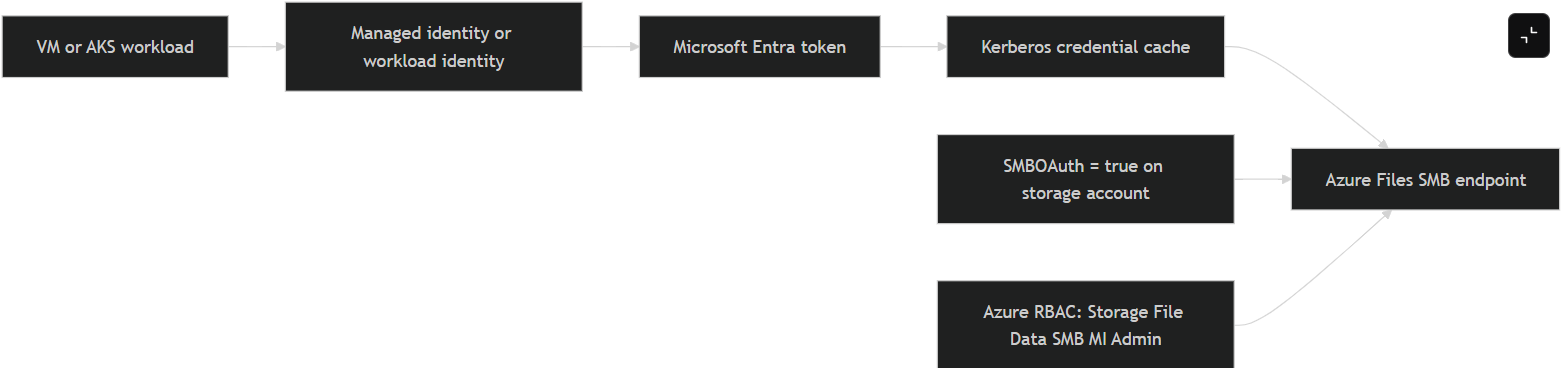
In practice, a minimal Azure CLI and client-side path looks like this, synthesized directly from Microsoft’s documented examples. The storage account commands and the mount/authentication sequence below reflect the officially documented knobs and command names.
# Storage account: enable SMB OAuth
az storage account create \
  --resource-group <resource-group> \
  --name <storage-account-name> \
  --location <region> \
  --sku Standard_LRS \
  --enable-smb-oauth true

az storage share create \
  --account-name <storage-account-name> \
  --name <file-share-name>

# Linux VM: obtain credentials using a system-assigned managed identity
sudo azfilesauthmanager set https://<storage-account-name>.file.core.windows.net --system

# Linux mount
sudo mount -t cifs \
  //<storage-account-name>.file.core.windows.net/<file-share-name> /mnt/smb \
  -o sec=krb5,cruid=<credential-id>,dir_mode=0755,file_mode=0755,serverino,nosharesock,mfsymlinks,actimeo=30
If you are doing this from AKS rather than a VM, the current Learn guidance says managed identity mounts are available in preview starting with AKS 1.34 on Linux nodes, and workload identity mounts are available in preview starting with AKS 1.35.0 on Linux nodes. The key CSI switches are mountWithManagedIdentity and mountWithWorkloadIdentityToken, plus an optional clientID when you want a user-assigned identity or workload identity path. For static PVs, the docs explicitly tell you to enable SMBOAuth on the target storage account first.
A representative AKS storage class fragment looks like this. It is not a new pattern invented for this report; it is a compacted version of Microsoft’s own documented parameters.
apiVersion: storage.k8s.io/v1
kind: StorageClass
metadata:
  name: azurefile-csi-wi
provisioner: file.csi.azure.com
parameters:
  storageAccount: EXISTING_STORAGE_ACCOUNT_NAME
  mountWithWorkloadIdentityToken: "true"
  clientID: "xxxxxxxx-xxxx-xxxx-xxxx-xxxxxxxxxxxx"
reclaimPolicy: Delete
allowVolumeExpansion: true
mountOptions:
  - dir_mode=0755
  - file_mode=0755
  - mfsymlinks
  - cache=strict
  - nosharesock
  - actimeo=30
  - nobrl
For troubleshooting, the official docs and Azure’s authentication utility repo give a pretty clean escalation path. On Windows, Microsoft documents verbose logging for SmbAuth and the creation of AzFilesSmbMILog.log. On Linux, the official Azure utility documents azfilesrefresh logs in /var/log/azfilesrefresh.log, main authentication logs in /var/log/syslog or /var/log/messages, and kernel/CIFS signals via dmesg | grep cifs. It also names two especially useful failure patterns: mount error(126): Required key not available, which usually points to missing or expired Kerberos material or CIFS helper issues, and mount error(13): Permission denied, which typically maps to invalid/expired tickets or missing RBAC on the storage account.
An illustrative redacted Linux troubleshooting sequence that aligns with the official guidance would look like this:
2026-04-24T08:12:31Z azfilesauthmanager: credential lookup failed for https://<redacted>.file.core.windows.net
mount error(13): Permission denied
Action taken:
  1. sudo azfilesauthmanager list
  2. Verified RBAC: Storage File Data SMB MI Admin on storage account
  3. Re-ran: sudo azfilesauthmanager set https://<redacted>.file.core.windows.net --system
  4. Restarted refresh daemon: sudo systemctl enable --now azfilesrefresh
The storage-side developer tooling is also now concrete enough for application teams that need deeper integration. Microsoft’s Azure Files managed identity doc references a .NET package version 1.2.3168.94 for managed assembly integration, while the Azure authentication utility repo documents the Linux azfilesauthmanager workflows, the refresh daemon, and the specific log files to inspect when things go sideways.
Impact assessment
From a platform perspective, the biggest win is not just security hygiene; it is operational simplification. A file share can now participate in a standard identity model instead of being a permanent outlier that still needs key vaulting, key rotation, and credential plumbing into hosts or pods. Microsoft also says the feature is supported on HDD and SSD SMB shares and across billing models, with no additional cost for the capability itself.
The secondary win is cleaner separation of duties. The Azure Files GA note explicitly calls out coexistence of application identities and end-user identity access on the same storage account. That means operations staff and applications can touch the same share without duplicating storage layouts purely for auth reasons. For regulated environments, the AKS workload identity angle is especially relevant because it moves SMB authorization closer to pod identity rather than node identity.
Mitigation and best practices
For production rollouts, the safest pattern is to treat the storage-account switch, RBAC assignment, client credential refresh, and mount validation as a single change unit. In other words, do not enable SMBOAuth and assume clients will “just work” later. Validate token refresh and actual SMB mount semantics in the same deployment window. Microsoft also recommends using one identity type per VM where possible rather than mixing system-assigned and user-assigned identities indiscriminately.
On Linux, enable azfilesrefresh immediately after the first successful mount. The official repo is very clear that without enable, the service will not survive reboot and ticket expiry can translate into mount failures later. In AKS, keep mount permissions tight unless the workload genuinely needs broad root-level write semantics; Microsoft’s examples show both conservative and permissive mount options, and the conservative path is the better default for multi-tenant clusters.
Finally, keep the GA/preview boundary straight in your design docs. The Azure Files capability is GA, but if your implementation path depends on AKS CSI preview features, record that explicitly in your production readiness review. That distinction will matter in support conversations and in change-risk scoring.
Suggested references
- Storage Blog announcement for the GA change and scope.
- Microsoft Learn guide for
SMBOAuth, RBAC, Windows and Linux client setup, and mounting steps. - Azure Files “What’s new” entry confirming the GA milestone and the included capabilities.
- AKS documentation for CSI-based managed identity and workload identity mounting patterns.
- Azure Files authentication utility repository for daemon behavior, logs, and common mount errors.